Explorating the World of Self-Hosting
This journey started from a simple realisation. The foundation of web applications that we use on a daily basis is the hardware. Cloud services provide abstracted features that seem magical. However, a simple VPS provides all the necessary tools required to deploy an application. Provided that you are willing to handle all the underlying symphony of components which are usually hidden, there is a rich open-source self-hosting community and ecosystem to support deploying an application suited for your own needs.
Personally, I had a desire for a cheap and reliable way to manage my finances. Initially, I stored transactions in an Excel spreadsheet — surprisingly functional despite all its flaws. I explored around the self-hosting community and found Firefly III, an open-source, self-hosted solution for managing your finances. Alas, the self-hosting rabbit hole started here.
Initial setup was easy by following the documentation. However, the lack of features that are normally taken for granted becomes painfully clear. Lack of HTTPS, service accessed manually through IP address and port number, lack of monitoring capabilities. It was also surprising to discover the frequency with which bots scan the internet to exploit vulnerabilities. Hence, secure access over the internet is required. Solving all these issues required many hours of reading documentation, trial and error, and motivation to come back to fix a seemingly never-ending abyss of issues.
Iteration through trial and error was a huge component of this journey. Looking back, my naivety in the past is embarrassing, to say the least. Yet, I suppose some naive optimism is what’s needed to get started. Even now, I am still iterating to improve upon decisions made naively in the past.
The set-up
Below is a conceptual overview of the whole set-up. The operation runs on a cheap but generous VPS from Hetzner, at $5.28 per month.
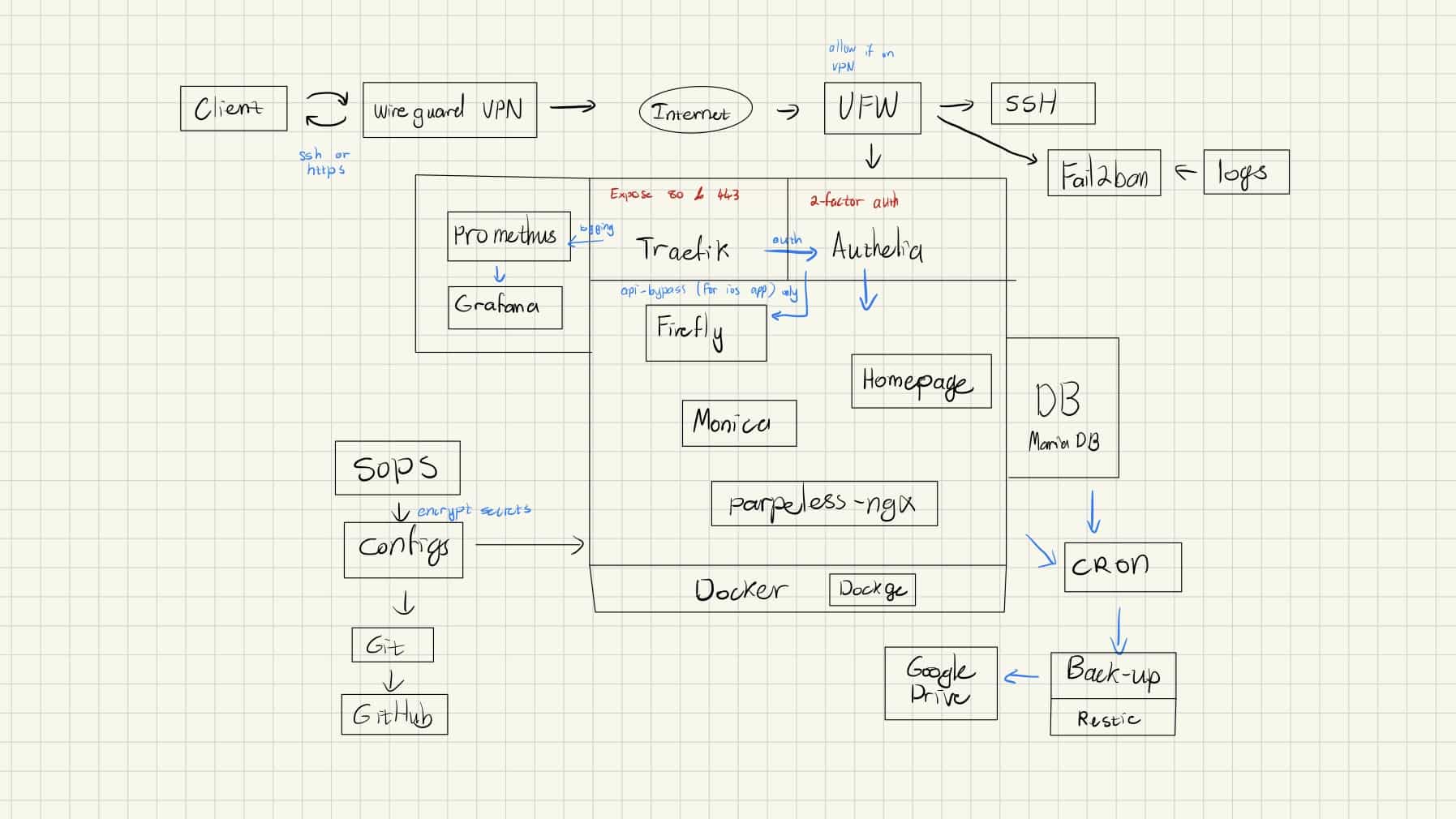
Ideally, self-hosting would be done with my own hardware. However, I found a VPS to suit my personal circumstances best. I initially started self-hosting by turning my old laptop into a Linux server, where you can use Tailscale to solve residential NAT and IP issues. However, load shedding and attending university in another city are major influencing factors in using a VPS.
Technologies
Docker
Docker plays a huge part in making it easy to deploy multiple application services and their configurations. All services are deployed and managed with Docker. An added benefit of containerisation is that most services can be horizontally scaled without much extra work.
Reverse proxy
Traefik is the reverse proxy in front of the applications on the server. It has very useful integrations with Docker and supports authentication middleware for hardening access.
Authentication
Traefik uses Authelia as a middleware to provide authentication and 2FA. It can also integrate with LDAP for single sign-on and a centralised credential store.
VPN
WireGuard is the tunnel used to reach the reverse proxy, and hence the application services. The firewall on the server is configured so that only requests arriving over the VPN are let through.
Security is a crucial consideration here, taken to the best of my current abilities, because of privacy and the management of confidential financial data. Resources are constrained, but it doesn’t mean that security should be neglected. Additionally, Canary honeypots are littered throughout the server as a safety measure to detect attacks that get past the measures already in place.